How to Speed Up Your WordPress Website in 2026: A Complete Beginner-Friendly Guide
If your WordPress site is slow, visitors won’t stick around — and search engines like Google and Bing won’t rank you highly. In 2026, website speed isn’t optional; it’s essential. A fast site improves Core Web Vitals, keeps visitors engaged, reduces bounce rates, and boosts conversions across all devices.
This guide walks you through practical, proven steps to make your WordPress website load fast — no fluff, no jargon.
1. Benchmark Your WordPress Performance First
Before making any changes, you need to know how your site performs now. Without a baseline, you won’t know if your optimizations actually work.
Why this matters:
Site speed isn’t a feeling — it’s data. Tools like Google PageSpeed Insights and GTmetrix give you exact scores for metrics that matter.
Key metrics to track:
- Largest Contentful Paint (LCP): Time for your main content to appear. Target: < 2.5 s
- Interaction to Next Paint (INP): Shows how snappy your site feels to users. Target: < 200 ms.
- Cumulative Layout Shift (CLS): How stable the layout is while loading. Target: ≤ 0.1
- Time to First Byte (TTFB): Measures how quickly your server starts responding. Target: < 400 ms
Tools to use:
- Google PageSpeed Insights (field + lab data)
- GTmetrix (visual waterfall charts)
- WebPageTest (in-depth metrics)
Action: Log your scores — you’ll want to compare them after each optimization step.
2. Upgrade Your Hosting & Server Environment
Your hosting setup affects nearly every speed metric, especially server response time and resource loading.
Hosting types that impact speed:
- Shared Hosting: Slowest, resources shared with other sites
- Managed WordPress Hosting: Fast, often includes built-in optimizations
- Cloud VPS / Cloud Hosting: Best performance and scalability
Pro tips: Look for hosting that uses:
- NVMe SSD storage
- HTTP/3 support
- Built-in caching
Server tweaks for WordPress speed:
✔ PHP 8.2+
✔ OPcache enabled for faster PHP execution
✔ Compression like Brotli (better than Gzip)
✔ Object caching via Redis or Memcached
3. Pick a Lightweight, Speed-Optimized Theme
Your theme sets the baseline weight of your site. Bloated themes with sliders, animations, or multiple page builders slow things down.
What to look for:
- Minimal CSS and JavaScript
- No unnecessary animation libraries
- Built for performance (e.g., GeneratePress, Astra, Kadence)
- Block-based themes that work well with WordPress editor
Tip: Avoid themes that bundle features you don’t need. Every extra script adds milliseconds.
4. Implement Robust Caching
Caching is one of the fastest ways to speed up your site. It reduces server work and delivers pages faster.
Types of caching:
- Page caching: Static HTML versions of your pages
- Browser caching: Keeps assets in your visitors’ browsers
- Object caching: Speeds up database-heavy sites
Top caching plugins:
- WP Rocket: Powerful, beginner-friendly
- LiteSpeed Cache: Great on LiteSpeed servers
- WP Super Cache: Free and simple
Pro tip: Only use one caching plugin to avoid conflicts.
5. Optimize Images & Media
Images often make up most of a page’s size. Optimizing them can dramatically reduce load time.
Best practices:
- Resize images before upload
- Convert your images to WebP or AVIF to make them smaller and load faster
- Lazy load images that aren’t immediately visible
- Preload hero images so they appear first
Recommended plugins: ShortPixel, Imagify, Smush
6. Streamline Plugins, CSS & JavaScript
Each plugin adds files that your site must load.
Plugin strategy:
- Remove unused plugins
- Replace multiple plugins with an all-in-one optimization tool
- Check plugin performance via waterfall charts
Code tips:
- Minify CSS and JavaScript
- Defer non-critical scripts
- Combine files when it makes sense
This reduces blocking resources and speeds up rendering.
7. Use a Content Delivery Network (CDN)
A CDN copies your static files around the world and delivers them from the nearest location, cutting latency and improving load times.
Benefits:
✔ Faster delivery of images, CSS, JS
✔ Lower server load
✔ Better global performance
Popular CDN options:
- Cloudflare: Free tier, global coverage
- BunnyCDN: Fast and affordable
- QUIC.cloud: Great for LiteSpeed servers
Note: Don’t cache dynamic pages like carts or checkouts on eCommerce sites.
8. Optimize Your WordPress Database
Over time, your database collects clutter: revisions, spam, expired data. Cleaning it speeds up queries and reduces load.
What to clean:
✔ Post revisions
✔ Expired transients
✔ Spam comments
✔ Unused tables
Tools to help: WP-Optimize, WP-Sweep
Tip: Schedule regular cleanups to keep your database lean.
9. Focus on Mobile Performance First
Google ranks based on mobile experience. A fast desktop site isn’t enough if mobile is slow.
Mobile optimization tips:
- Minimize DOM size
- Avoid layout shifts (ads, resizing banners)
- Test on real devices and throttled networks
Remember: Mobile performance often relies on perceived speed, not just numbers.
10. Maintenance & Monitoring
Speed isn’t a “set it and forget it” thing. Regular monitoring keeps your site fast.
Ongoing tasks:
✔ Monthly speed tests
✔ Plugin/theme updates
✔ Test after major changes
✔ Track real-user Core Web Vitals
11. Common WordPress Speed Myths (Debunked)
- More plugins = slower site: Not always. It’s heavy plugins that matter.
- 100 PageSpeed score = fast site: Core Web Vitals matter more than vanity scores.
- CDN fixes everything: CDN helps, but server and code optimizations are still required.
✅ Conclusion: Build for Speed in 2026
To make your WordPress site lightning-fast:
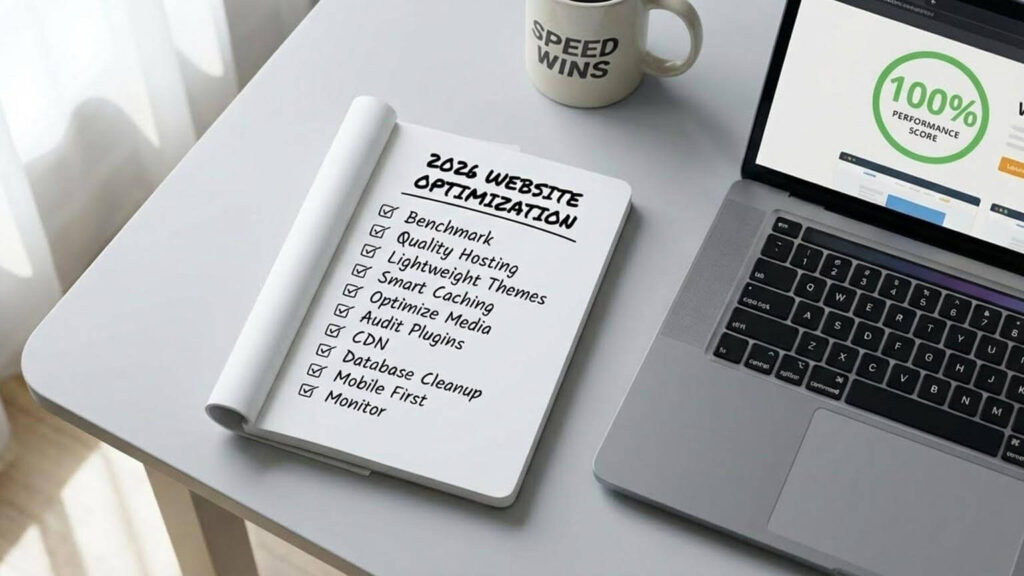
- Benchmark your current performance
- Use quality hosting + server optimizations
- Pick lightweight themes
- Enable smart caching
- Optimize images & media
- Audit plugins & code
- Serve files via CDN
- Clean up your database
- Prioritize mobile
- Monitor continuously
Fast sites rank higher, convert better, and keep visitors happy — now and in the future.