Best 7-Step Kadence Themes Setup Tutorial (2026)
If you want to build a lightning-fast WordPress site this year, setting up kadence themes correctly is the absolute best place to start. Forget everything you knew about heavy page builders. In 2026, building a successful website is all about using native WordPress tools, clean code, and smart AI integrations.
This guide walks you through the exact setup process professional developers use to get perfect performance scores and incredible design flexibility. We are going to skip the filler and dive straight into what actually works in the real world.
Quick Answer: How to Set Up Kadence Themes
Setting up your framework involves a straightforward, seven-step process. Following this exact sequence ensures you hit maximum speed and maintain a highly organized structure from day one.
- Step 1 Install the core files for a clean, fast foundation.
- Step 2 Add dynamic blocks and necessary companion plugins.
- Step 3 Deploy AI-powered starter templates to skip wireframing.
- Step 4 Set your global typography rules and color palettes.
- Step 5 Build your custom header and footer layouts visually.
- Step 6 Adjust your default page and post display rules.
- Step 7 Update your permalinks for better technical SEO.
Table of Contents
Install the Core Framework
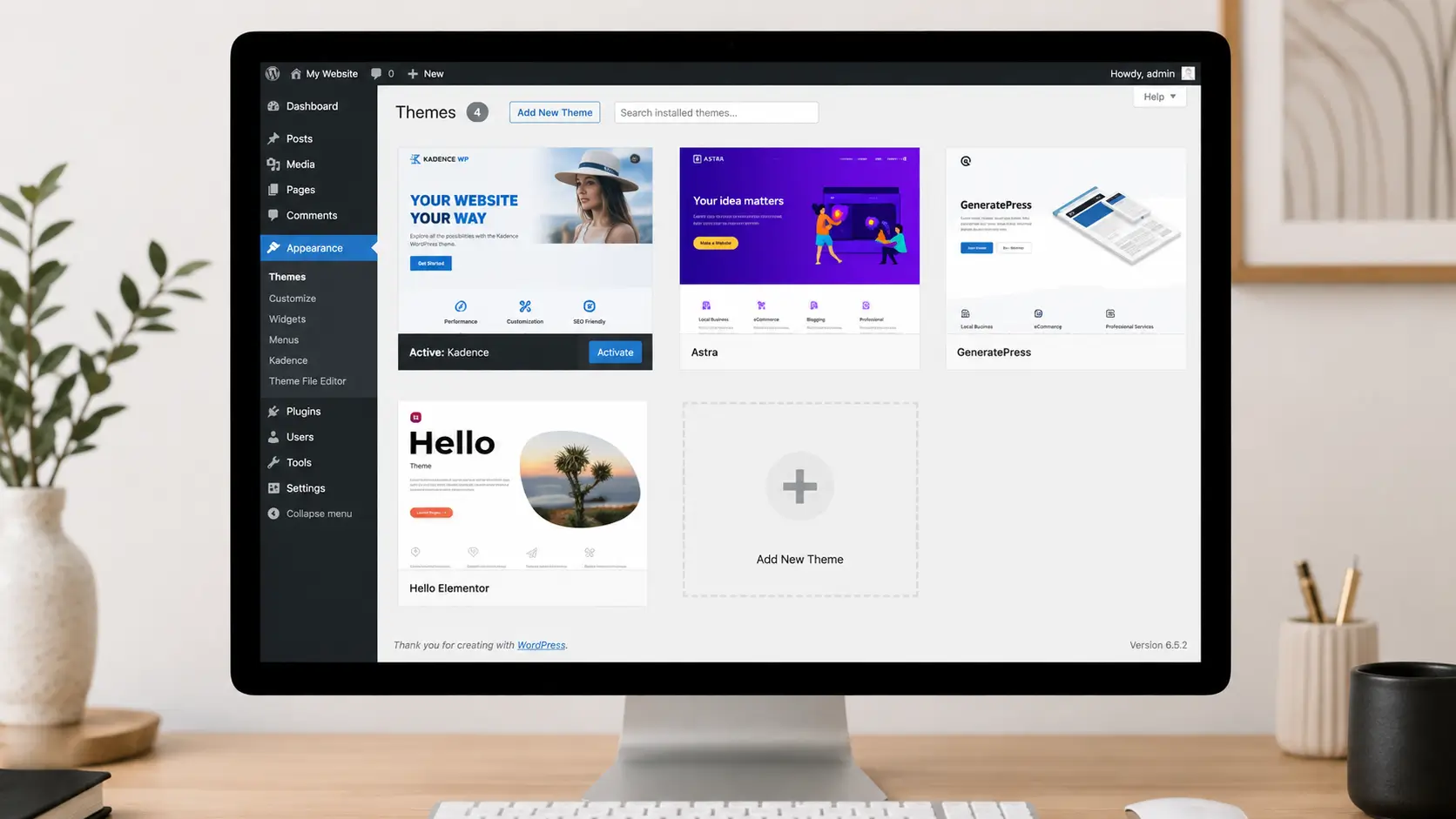
Your very first move is grabbing the core files. Navigate straight to your WordPress dashboard. Click on Appearance, select Themes, and hit the Add New button. Search for the theme, install it, and activate it right away.
This gives you a completely clean, bloat-free Document Object Model (DOM). Why does this matter so much? Older page builders inject tons of unnecessary HTML wrapper code into every single page. This native approach completely avoids that mess. It outputs minimal, semantic code that search engines love to index.
Real-world data shows that this specific framework consistently passes Google Core Web Vitals right out of the box. You rarely even need a child theme anymore. The built-in hook elements handle all custom code injections beautifully, saving you time and reducing server requests.
Add Essential Tools (Plus Reviews)
A lightweight base needs the right tools to become a powerhouse. You need the companion blocks plugin to upgrade the default Gutenberg editor. This gives you advanced layout controls without slowing down your server. To help you decide what to install, here is a detailed breakdown of your main options.
Kadence Themes Free Core
Description paragraph:
This is the foundational free version available directly from the standard WordPress repository. It provides the core customizer settings, global color palettes, and a visual header builder. It is incredibly lightweight and serves as the perfect starting point for any blog, portfolio, or basic business website.
Best for:
Beginners, hobbyists, and developers building simple, fast brochure websites on a tight budget.
Overview:
The free version gives you unprecedented control compared to other free options currently on the market. You get global typography clamping, a drag-and-drop header builder with multiple rows, and access to a decent library of basic starter templates. It relies entirely on the native block editor. This keeps your database queries lean and ensures your site remains highly responsive under heavy traffic.
Key features:
Price: Free forever.
Kadence Themes Pro Bundle
Description paragraph:
The Pro bundle unlocks the full suite of premium tools, including advanced header addons, custom hook elements, and deep WooCommerce shop builder tools. This upgrade turns a simple blog into a highly customized, dynamic platform capable of handling complex directories, membership portals, and high-converting online stores.
Best for:
Agencies, serious eCommerce store owners, and professional developers who need deep customization without writing custom PHP scripts.
Overview:
When you step up to the premium level, you unlock Hooked Elements. This feature completely changes how you build sites. You can inject custom designs, promotional banners, or dynamic data anywhere on the site based on user roles or specific pages. It also includes the premium block suite, giving you access to advanced animation tools, dynamic data fetching, and an expansive library of premium templates.
Key features:
Price: Starts at roughly $149 per year for the Essentials bundle.
Deploy AI Starter Templates
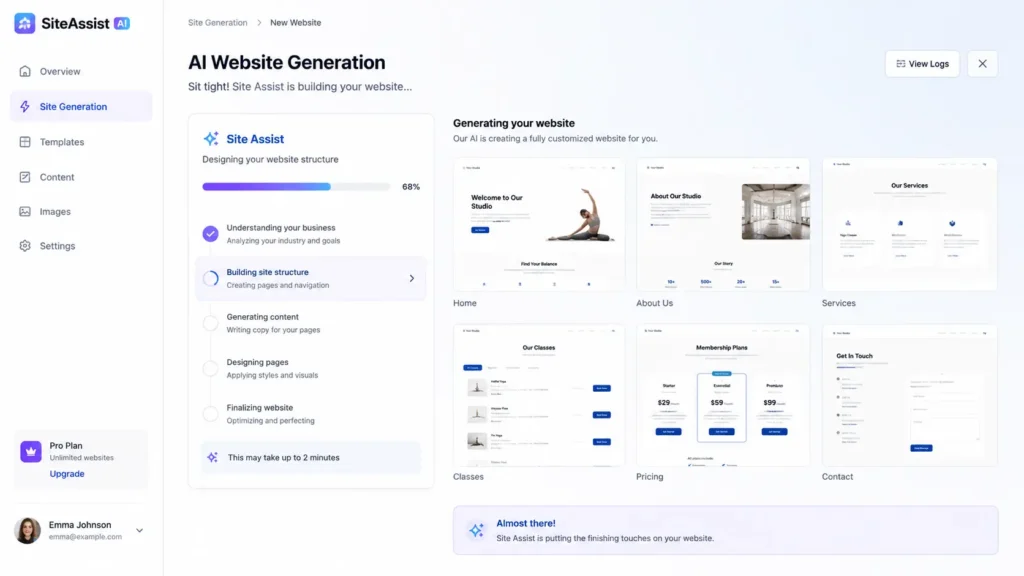
Never start a project entirely from scratch if you don’t have to. The modern workflow heavily utilizes built-in AI tools to generate your base site structures. Once your plugins are active, launch the built-in Site Assist wizard.
You just enter your brand name, your niche, and the tone of voice you want to use. The AI engine immediately generates personalized wireframes, relevant placeholder images, and functional copy. This completely eliminates hours of manual layout building.
Your initial structure is ready in just a few minutes. You can easily tweak the generated images and text before clicking import. This is exactly how smart web developers ship client sites so fast in 2026.
Configure Global Design Systems
Visual consistency makes a site look professional and trustworthy. Use the native WordPress Customizer to set your global color palettes. This framework features dynamic palettes that easily adapt to dark mode setups seamlessly.
When you set colors globally, changing one variable instantly updates your buttons, links, and backgrounds across the entire site. Next, set up clamping typography. Clamping uses math equations to scale your font sizes perfectly between mobile and desktop screens.
You won’t ever have to write manual CSS media queries for heading sizes again. Your custom CSS file stays incredibly clean, highly manageable, and very fast to load.
Customize Your Header for Conversions
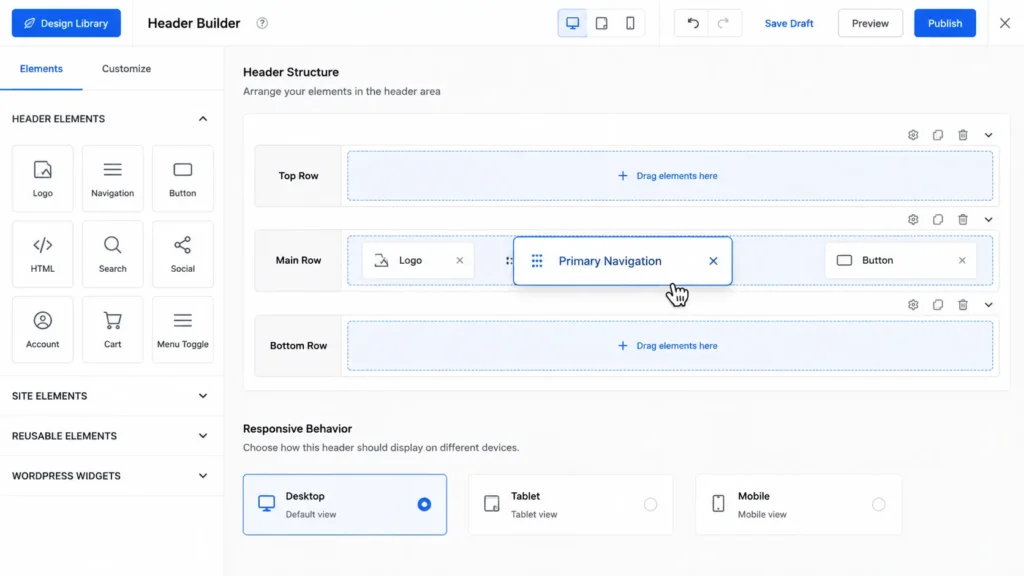
Your site navigation dictates how long users stay on your site and where they click. Use the visual drag-and-drop builder to construct your headers. You can place your logo, social icons, and primary call-to-action buttons into specific grid rows effortlessly.
The best part is creating conditional headers. Professional developers build specific, distraction-free headers exclusively for checkout pages. By removing secondary links on a sales page, you keep the user completely focused on finishing the transaction. This targeted approach significantly boosts your overall conversion rates.
Adjust Default Page Layouts
Standard pages need strict default rules to look visually unified. Set your maximum content width and sidebar visibility settings globally in the customizer. This ensures that every time you hit publish on a new blog post, it follows the exact same visual hierarchy automatically.
You can also apply these layout rules directly to custom post types. If you build a portfolio section using tools like JetEngine, you can assign a full-width layout specifically to those items. This ensures seamless, high-quality styling across many different types of content on your website without messy page-level overrides.
Set Core Permalinks and Verify Speed
Technical SEO demands clean, readable URL structures to rank properly. Go into your WordPress settings and change your permalinks to the “Post name” structure. This removes messy dates from your URLs and makes them completely keyword-friendly.
Always save these settings twice to ensure your server flushes the rewrite rules properly. Finally, run a quick speed test using Google PageSpeed Insights. Enable the local Google Fonts hosting inside your theme performance settings to prevent external server requests. Your complete site is now technically ready, indexed properly, and blazing fast.
FAQs About the Setup
Ready to Build Your High-Performance Site?
Stop wrestling with bloated themes. Get the speed, security, and premium setup your business deserves by partnering with an expert developer.
Conclusion
Building a website doesn’t have to be a sluggish, bloated mess. By utilizing native tools and following this exact sequence, you can launch a project that looks beautiful and performs brilliantly on mobile networks. The real key is leaning into the core features instead of installing dozens of unnecessary third-party plugins. Master this workflow, and your web development process will become faster, more enjoyable, and highly profitable. Setting up kadence themes correctly is the ultimate competitive advantage for modern creators right now.