
What is a Dynamic Website in WordPress? Ultimate 2026 Guide
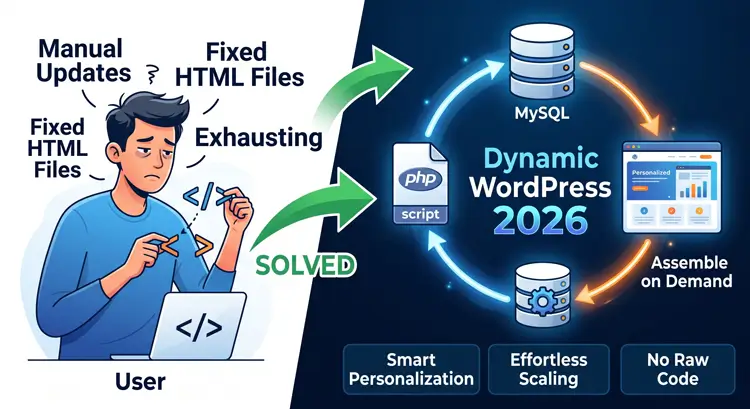
For those in a rush, here is the short version of what is a dynamic website in WordPress? It is a website that generates its pages in real-time using a database, rather than serving pre-made HTML files. When a visitor clicks a link, the server instantly pulls your text, images, and layout settings from a MySQL database and pieces them together using PHP. This allows for effortless content updates, personalized user experiences, and the ability to manage thousands of pages from a single template without touching any code.
Wondering, what is a dynamic website in WordPress? You are definitely not alone. As a business owner, web designer, or digital marketer, managing website content can become incredibly exhausting if you do not have the right architecture. If you are tired of manually editing fixed HTML files every time you want to update a single word or image, you are in the perfect place to learn the solution. If someone asks you what is a dynamic website in WordPress?, you will have the perfect answer by the end of this guide.
Understanding exactly what is a dynamic website in WordPress? will completely change how you build, manage, and scale your web projects. This modern architecture uses PHP scripts and a MySQL database to assemble web pages on-demand the exact moment a user clicks a link.
In this comprehensive guide, we will break down exactly how this entire ecosystem works behind the scenes. We will explore the technical mechanics, the business advantages, and why knowing what is a dynamic website in WordPress? gives you a massive advantage in ranking on search engines. You will learn how to improve user experience and scale your business without writing endless lines of code. Let’s dive deep into the details.
Table of Contents
- What is a dynamic website in WordPress? (The Simple Answer)
- Core Technology: The “Process” Explained
- Key Benefits of a Dynamic Architecture
- Static vs. Dynamic Websites: Which is Best for You?
- 5 Real-World Examples of Dynamic Functionality
- How to Build One (The “Smart” Way)
- The Essential WordPress Tool Stack
- The Hidden Challenge: Optimizing Dynamic Sites for Speed
- Frequently Asked Questions (FAQs)
- Conclusion
What is a dynamic website in WordPress? (The Simple Answer)
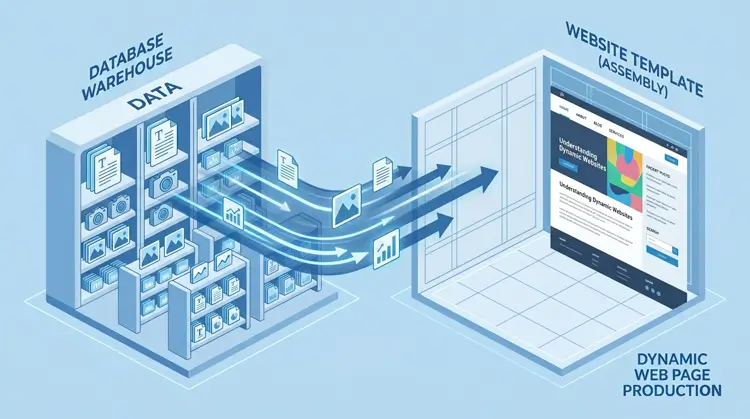
Let’s start from the very beginning with a clear definition. If you ask a professional web developer, “what is a dynamic website in WordPress?” they will tell you it is a website where the content is generated in real-time by a web server. It is not delivered as a pre-written, fixed HTML file.
To make this easy to visualize, imagine your website as an empty, beautifully designed room. This room represents your website’s template or theme. The furniture, the paint color, and the wall decorations represent your actual data (text, images, prices). All of this data is stored securely in a massive, highly organized warehouse, which represents your database.
When a visitor clicks to open your page, the server instantly runs to the warehouse, grabs the exact furniture needed for that specific visitor, and places it perfectly in the room. By the time the page loads on their screen, everything is fully arranged. This means you do not have to build a brand new room for every single visitor. When people search Google for what is a dynamic website in WordPress?, they are usually looking for this exact kind of ultimate flexibility. It perfectly separates the “design” of the site from the “content” of the site.
Core Technology: The “Process” Explained
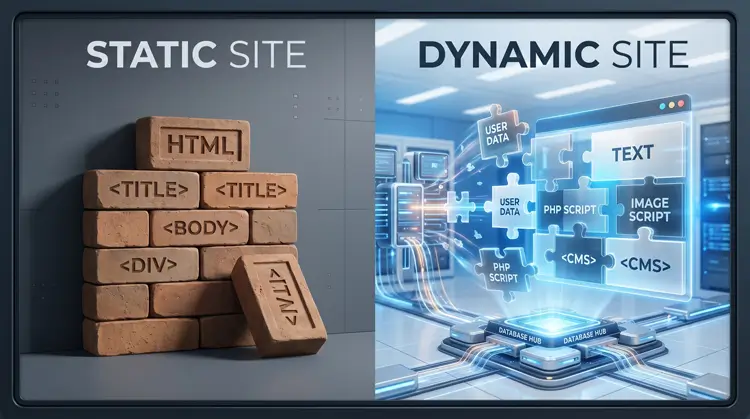
When someone visits your website, they are not just downloading a simple, flat file. They are triggering a complex, high-speed, invisible sequence. To fully grasp what is a dynamic website in WordPress?, you need to look closely at this backend process.
Here is the exact step-by-step breakdown of how it works in mere milliseconds:
- The Request: The user’s web browser asks the server to load a specific URL (for example, your latest blog post or a product page).
- The Brain (PHP): The web server wakes up the PHP processing engine. PHP is the core scripting language that WordPress is built upon.
- The Memory (Database): PHP sends a query to the MySQL database. It asks for that specific post’s text content, featured images, author details, and custom settings.
- The Assembly: PHP pulls all that raw data and seamlessly injects it into a pre-designed template skeleton.
- The Delivery: A perfectly formatted, fresh HTML page is sent back to the user’s browser.
This entire sequence happens in the blink of an eye. Understanding what is a dynamic website in WordPress? means understanding this perfect, high-speed marriage between PHP processing and MySQL data storage.
Key Benefits of a Dynamic Architecture
Why should you choose this advanced setup over a basic, static HTML site? Another massive reason people want to know what is a dynamic website in WordPress? is to understand the actual business return on investment. The advantages are absolutely massive for growing brands and agencies.
- Effortless Content Management: You update text, publish blogs, and upload images through a simple, visual dashboard. You never have to touch or look at a single line of raw code.
- Smart Personalization: You can show completely unique content to different users. For example, showing a “Welcome Back” message to logged-in users, or displaying different pricing based on their geographic location.
- Infinite Scalability: You can easily manage ten thousand blog posts or products using just one single template layout. A static site would require a web designer to manually build ten thousand separate files.
- Advanced Interactivity: It allows you to build complex, engaging features like e-commerce shopping carts, secure user account dashboards, and live Ajax search filtering.
- Team Collaboration: Multiple authors and editors can log into the backend simultaneously to write and publish content without breaking the site’s code.
If your clients are still wondering what is a dynamic website in WordPress?, explain it to them as the ultimate business tool for automated growth and effortless scaling.
Static vs. Dynamic Websites: Which is Best for You?
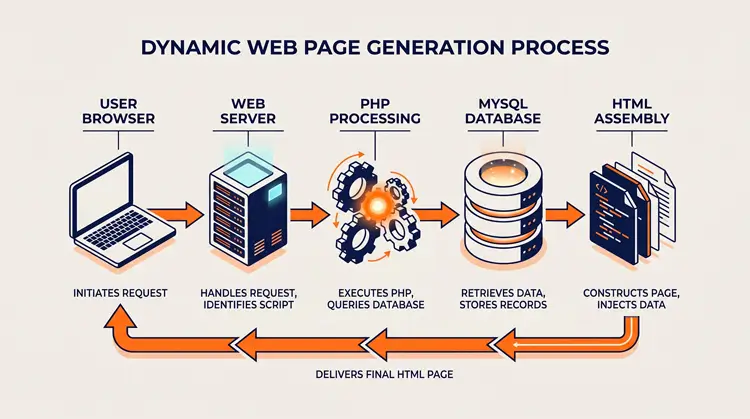
To truly answer what is a dynamic website in WordPress?, we must compare it directly to an old-school static website. According to general web development principles, static sites are great for basic, five-page company brochures. But they fail miserably when you need to scale or add functionality.
Here is a quick, scannable breakdown of the core differences:
| Feature | Static Website | Dynamic Website (WordPress) |
| Content Delivery | Sends a pre-built HTML file | Generates page “on the fly” |
| Updating Content | Must edit HTML code manually | Log into a dashboard; no code needed |
| User Experience | Identical for every single visitor | Personalized per user or interaction |
| Database Usage | None. Data is hardcoded. | Uses MySQL to store all information. |
| Speed | Extremely fast by default | Slower unless optimized with proper caching |
If you plan to publish regular blog content, sell digital or physical services, or build an active audience, a dynamic setup is mandatory. It is not an option; it is a fundamental necessity for modern web design.
5 Real-World Examples of Dynamic Functionality
Most technical guides skip the practical, real-world applications. When my web design clients ask me what is a dynamic website in WordPress?, I always show them these exact examples. These examples define what is a dynamic website in WordPress? better than any textbook ever could.
- E-commerce Stores: Shopping carts that update product prices, calculate shipping variations, and adjust stock levels instantly based on live database inventory.
- Real Estate Directories: Advanced search filters that allow users to sort hundreds of properties by price, location, square footage, and agent using custom database queries.
- Membership Portals: Secure user dashboards that hide premium video content from free users, but reveal it automatically based on the user’s active subscription tier.
- Job Boards: Platforms where employers can submit a form on the frontend, and the website automatically generates a beautifully formatted job listing page.
- Automated Related Posts: Sections at the bottom of a blog that dynamically suggest new reading material based on the current category or tags the user is viewing.
How to Build One (The “Smart” Way)
People who search for what is a dynamic website in WordPress? usually want to build one for their own business or their clients. Five years ago, you needed to hire a senior PHP developer to do this.
Today, modern WordPress sites utilize specialized visual tools. You can create complex dynamic data structures visually, without writing any custom PHP code. Here is the modern method the professionals use to set this up:
- Create the Custom Post Type (CPT): You extend WordPress far beyond standard “Posts”. Using a dedicated tool, you first define the structure. If you are building a real estate site, you create a ‘Properties’ CPT.
- Assign Custom Fields: You add specific, granular data points to those custom posts. Instead of dumping everything into one big text editor, you create dedicated fields for “Pricing”, “Exact Locations”, or “Video URLs”.
- Build the Listing Item: You design a single loop item using a visual builder. This dictates exactly how one single property looks on the frontend grid.
- Display with a Query Loop: Finally, you drop a grid widget onto your page and tell it to dynamically pull all ‘Properties’ from the database.
The Essential WordPress Tool Stack
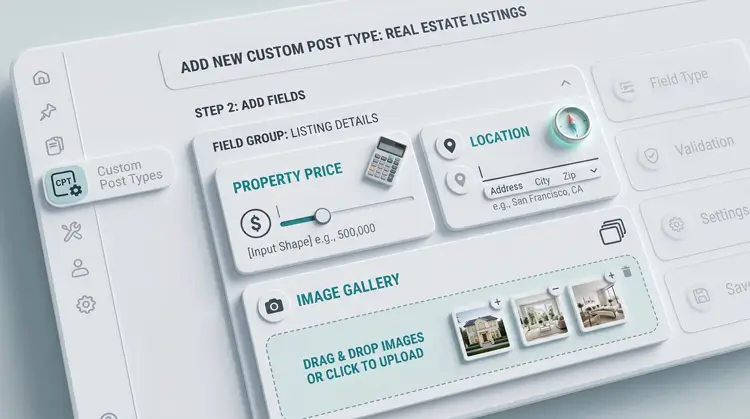
To execute the smart method described above, you absolutely need the right plugins. Using the wrong tools will bloat your site, slow it down, and ruin your Google SEO rankings. When researching what is a dynamic website in WordPress?, you must also research the modern tools that power them. Mastering what is a dynamic website in WordPress? means mastering these specific tools:
- Data Engines: Advanced Custom Fields (ACF) or JetEngine are the absolute industry standards for creating your custom fields and custom post types. JetEngine is highly recommended for building complex logic, dynamic repeaters, and advanced grid layouts.
- Visual Assembly: Use Kadence Theme and Kadence Blocks for incredibly fast, lightweight load speeds. If you need total, unrestricted design flexibility, Elementor Pro is the top choice. Both of these tools handle dynamic data integration perfectly.
The Hidden Challenge: Optimizing Dynamic Sites for Speed

There is one major caveat you must understand when learning what is a dynamic website in WordPress?. Because these sites use server processing power and run database queries for every single visitor, they are naturally heavier and slower than static HTML sites.
If you do not optimize them, Google will penalize your rankings for slow Core Web Vitals. Here is exactly how you fix it:
- Object Caching: Use Redis or Memcached. This stops the server from doing repetitive database queries. It remembers the result of a database query and serves it instantly the next time.
- Page Caching: Use a premium plugin like WP Rocket. This turns your heavy dynamic pages into lightweight, temporary static HTML files for lightning-fast delivery to end-users.
- Quality Hosting: Dynamic sites require robust server resources. Cheap, shared hosting will cause your database to crash. Always use managed WordPress hosting or a dedicated VPS.
Frequently Asked Questions (FAQs)
Conclusion
So, finally, let’s wrap up our core question: what is a dynamic website in WordPress? It is an incredibly powerful, data-driven system that uses a database to construct web pages on demand. It is the ultimate digital solution for achieving a scalable, personalized, and highly professional web presence. Now you can confidently explain what is a dynamic website in WordPress? to anyone.
By utilizing Custom Post Types and modern visual builders like JetEngine, Elementor, or Kadence, you can build enterprise-level web platforms without writing raw PHP. Ensure you set up your server caching correctly, structure your data logically, and you will have a website ready to dominate search engine results and serve your global audience perfectly.