How to Create a Dynamic Website in WordPress (5 Best Ways)

You can create a dynamic WordPress website using five main methods: 1. Visual Page Builders (Elementor), 2. Custom Post Types & Fields (ACF/JetEngine), 3. Dynamic-ready Themes (Kadence), 4. Specialized Dynamic Plugins, and 5. Custom PHP/Hooks. For most developers, a combination of ACF/JetEngine and Elementor provides the best balance of power and speed.
If you want to create a dynamic website in WordPress, you are in the exact right place.
Building static, page-by-page websites is a thing of the past. Today, the most successful sites are living, breathing ecosystems that adapt to their users. But how do you actually make that transition without breaking your site or writing thousands of lines of PHP code?
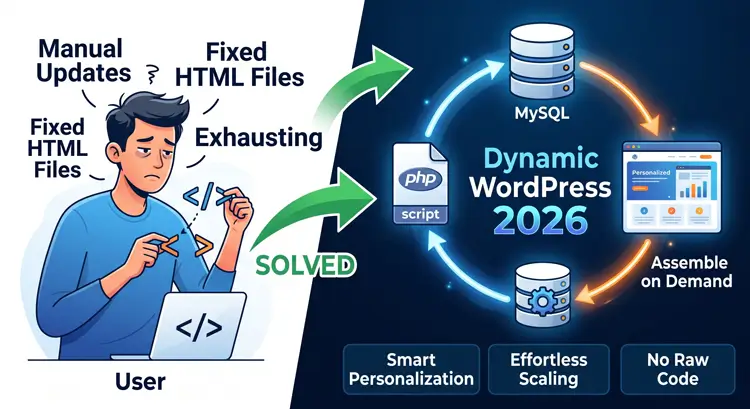
When you decide to create a dynamic website in WordPress, you are shifting from a manual “designing pages” mindset to a smart “building templates” mindset. You build the structure once, and your database fills in the blanks automatically.
Whether you are building an authority blog, a video editing portfolio, or a high-traffic e-commerce store, this guide will walk you through exactly how to do it.
Table of Contents
- What Actually Is a Dynamic Site?
- Why You Need to Upgrade Now
- 5 Best Ways to Create a Dynamic Website in WordPress
- 1. Visual Theme Builders (The Frontend Approach)
- 2. Custom Post Types (CPT) and Meta Fields (The Data Approach)
- 3. All-in-One Dynamic Toolkits (The Powerhouse Approach)
- 4. Interactive Forms with Conditional Logic (The User-Driven Approach)
- 5. Membership and E-commerce Personalization (The Contextual Approach)
- Crucial Optimization for Dynamic WordPress Sites
- Frequently Asked Questions (FAQs)
What Actually Is a Dynamic Site?
Before we dive into the methods, let’s establish what happens when you create a dynamic website in WordPress.
A static website delivers the exact same pre-written HTML file to every single visitor. A dynamic website, on the other hand, puts the page together on the fly. It reaches into your WordPress database, pulls out specific data (like an author’s name, a custom video link, or a dynamically calculated price), and displays it inside a pre-designed template.
This means you can update a single database field, and your entire website updates instantly.
Why You Need to Upgrade Now
Why should you put in the effort to create a dynamic website in WordPress? The benefits are massive, especially for SEO and scalability.
- Ultimate Scalability: You can add 1,000 new articles or video projects to your site without ever designing a new layout. The template handles the design; you just input the data.
- E-E-A-T and SEO Advantage: Search engines reward sites that offer rich, structured data. Dynamic sites allow you to organize your content logically, which helps Google understand your authority in your specific niche.
- Better User Experience: You can show personalized content based on user behavior, device, or login status, drastically increasing your conversion rates.
5 Best Ways to Create a Dynamic Website in WordPress
There is no single “right” way to do this. The method you choose depends on your technical comfort level and the specific goals of your project. Here are the five most effective, industry-proven methods to create a dynamic website in WordPress today.
1. Visual Theme Builders (The Frontend Approach)

The most visually intuitive way to create a dynamic website in WordPress is by using modern page builders or block builders. This method is perfect for visual thinkers and designers.
Using Heavy Page Builders (Elementor Pro) Tools like Elementor Pro feature powerful “Theme Builders.” Instead of opening a blank page, you open a “Single Post Template.”
- The Process: You drag a “Post Title” widget to the top of the screen. You drag a “Featured Image” widget below it.
- The Magic: These are not static text boxes. They are dynamic placeholders. Every time you publish a new blog post, Elementor routes your new text and images through this master template.
The Lightweight Block Builder Advantage (Kadence) If you are strictly focused on Core Web Vitals and fast loading times, you might want to create a dynamic website in WordPress using native block tools.
- The Process: Utilizing a fast theme paired with tools like Kadence Blocks Proallows you to pull dynamic data directly inside the default WordPress Gutenberg editor.
- The Magic: Because you are not loading a massive third-party page builder, your code remains incredibly clean. You get the power of dynamic templates without the heavy CSS and JavaScript bloat, ensuring your site remains lightning-fast.
2. Custom Post Types (CPT) and Meta Fields (The Data Approach)

If you are building something beyond a standard blog—like a portfolio for your video editing services or a directory for nature relaxation videos—standard “Posts” and “Pages” will not cut it.
Structuring with Custom Post Types To properly create a dynamic website in WordPress, you need to organize your backend. By installing the Custom Post Type UI (CPT UI) plugin, you can create entirely new categories in your WordPress dashboard. Instead of clicking “Add New Post,” you can click “Add New Video Project” or “Add New Client Portfolio.”
Injecting Data with Advanced Custom Fields (ACF) This is where the real power unlocks. Standard WordPress only gives you a title box and a big text area. That is not enough data.
- The Solution: Use Advanced Custom Fields (ACF)to attach specific input boxes to your new Custom Post Types.
- The Execution: For a video portfolio, you can create an ACF field for “Software Used” (e.g., Premiere Pro, After Effects), another for “Project Duration,” and a third for the “Client URL.”
- The Result: When you map these custom fields to your visual templates, every portfolio piece displays its unique data perfectly formatted, every single time.
3. All-in-One Dynamic Toolkits (The Powerhouse Approach)
Sometimes, piecing together four different plugins causes conflicts. If you want to create a dynamic website in WordPress using a highly stable, integrated ecosystem, you need an all-in-one toolkit.
Enter JetEngine by Crocoblock JetEngine is widely considered the industry standard for complex data architecture. It handles the custom post types, the custom fields, and the frontend display widgets all under one roof.
Building Dynamic Listing Grids When you create a dynamic website in WordPress with JetEngine, you aren’t limited to standard blog rolls. You can design “Dynamic Listing Grids.”
- Imagine designing one perfect layout for a single video thumbnail, title, and “Watch Now” button.
- JetEngine takes that single design and automatically loops it to display your entire database of content in a beautifully responsive grid.
AJAX Filtering for Ultimate UX The biggest superpower of JetEngine is its frontend AJAX filtering. Users can click a sidebar filter (e.g., “Show only After Effects projects” or “Show only Piano Relaxation Music”) and the grid updates instantly without the webpage reloading. This frictionless experience keeps users on your site longer.
4. Interactive Forms with Conditional Logic (The User-Driven Approach)
Most people forget about forms when they set out to create a dynamic website in WordPress. However, forms are the most direct way a website interacts dynamically with a user.
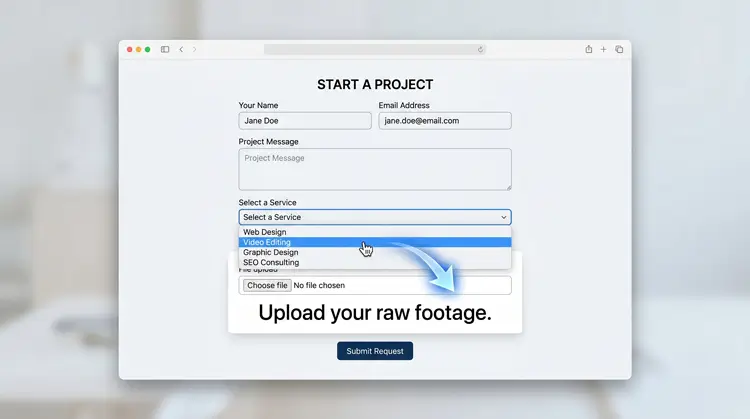
Smart Forms React in Real-Time Standard contact forms are static and boring. Smart forms built with plugins like Gravity Forms, Bit Form, or WS Form use “conditional logic” to change their shape based on what the user is typing.
How to Implement It:
- If a visitor wants to hire your agency, they select “Web Development” from a dropdown menu.
- Instantly, a new field appears asking, “Do you need WordPress or custom coding?”
- If they had selected “Video Editing,” that field remains hidden, and instead, a field asking “Upload your raw footage” appears.
- By using conditional logic, you create a dynamic website in WordPress that feels like a personalized conversation, drastically improving your lead generation quality.
5. Membership and E-commerce Personalization (The Contextual Approach)
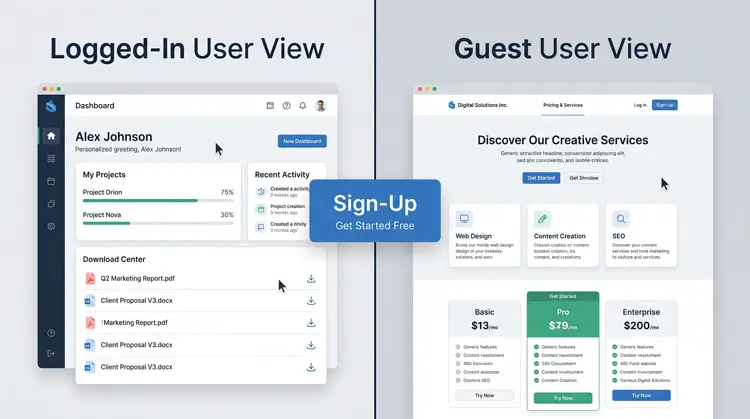
The highest level of dynamic design occurs when the website actually recognizes who is looking at the screen. To create a dynamic website in WordPress that drives revenue, you must embrace contextual personalization.
Dynamic E-commerce (WooCommerce) WooCommerce turns your static site into a dynamic storefront. It tracks cookies and user accounts to generate personalized shopping carts. It dynamically displays “Related Products” based on the specific category the user is browsing, and updates inventory levels globally the second a purchase is made.
Dynamic Visibility (MemberPress) You can also create a dynamic website in WordPress by hiding and revealing content based on user roles.
- Using plugins like MemberPress or Paid Memberships Pro, you can set strict visibility conditions on your visual blocks.
- A logged-in, paying client might see a specialized dashboard with project updates and downloadable files.
- A random guest visiting that exact same URL will dynamically see a “Pricing & Services” landing page prompting them to sign up.
Crucial Optimization for Dynamic WordPress Sites

It is a harsh reality: dynamic sites are heavier than static sites. Every time a page loads, the server has to query the database, pull the custom fields, and assemble the template. If you do not optimize properly when you create a dynamic website in WordPress, your site will crawl, and your Google rankings will tank.
1. Conquering Core Web Vitals
Speed is not optional. To keep your Time to First Byte (TTFB) fast, you cannot rely on cheap shared hosting. You need a host that specializes in heavy PHP workers and database queries.
- The Fix: You must implement aggressive caching. Use a premium tool like WP Rocket to create static HTML snapshots of your dynamic pages. Furthermore, ensure your hosting environment has “Object Caching” (like Redis or Memcached) enabled so your database doesn’t have to process the exact same query twice.
2. Mastering Mobile Responsiveness & Complex Themes
When you create a dynamic website in WordPress, you often introduce complex layouts. Magazine-style themes (like the popular Soledad theme) are incredible for dynamic data, but their intricate menus and sidebars can easily break on mobile screens.
- The Fix: Never trust the default mobile view. You will frequently need to dive into the custom CSS customizer. For example, complex off-canvas panels often slide in from the wrong direction or have poorly positioned close buttons on mobile. You must be prepared to write specific CSS media queries to override default panel behaviors and properly position overlay functionality to ensure a seamless mobile user experience.
Frequently Asked Questions (FAQs)
Next Steps
You now have the exact blueprint. The best way to start is not by installing plugins, but by grabbing a piece of paper. Map out the exact data you want your site to hold. Decide what your Custom Post Types will be, and list out the specific Custom Fields you need for each one.
Once your data architecture is planned out, you are ready to create a dynamic website in WordPress that will scale infinitely and leave your competitors in the dust.