Top 5 Best SEO Plugin WordPress
Finding the best SEO plugin WordPress offers in 2026 is the most critical technical choice you can make for your site’s foundation.
To give you the exact answer right up front: The top tier right now consists of Rank Math (best for AI and lightweight design), All in One SEO / AIOSEO (best for local search and corporate builds), Yoast SEO (best for strict beginner guidance), SEOPress (best for white-labeled client handoffs), and The SEO Framework (best for absolute performance).
Choosing the right tool dictates how well your custom data is read, how fast your site loads, and whether you can actually compete in highly saturated markets like the US and UK.
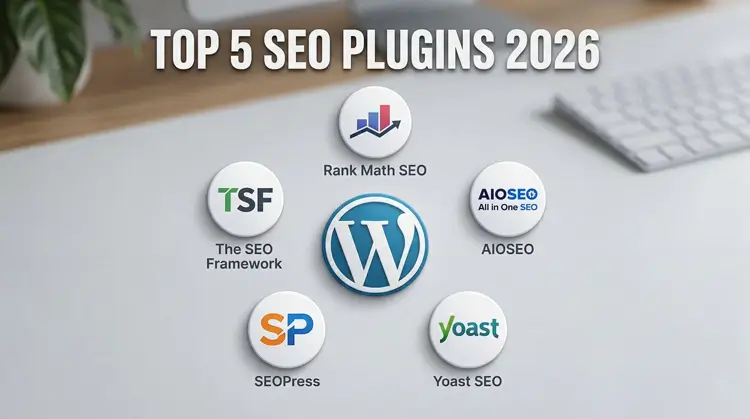
Table of Contents
- Introduction: The 2026 SEO Reality
- What Makes a Top-Tier Plugin in 2026?
- The Top 5 Best SEO Plugin WordPress Contenders
- Modern Build Compatibility: Custom Fields & Grids
- The Speed Multiplier: Pairing with WP Rocket
- Conclusion & Final Verdict
I. Introduction: The 2026 SEO Reality
The search landscape has aggressively shifted. Slapping a keyword in a title tag and calling it a day no longer works.
Modern tools have to handle comprehensive on-page optimization, complex schema markup, and advanced sitemap generation.
A truly great plugin does more than flash a green light. It actively structures your content, tightens your technical SEO, and pushes your visibility higher in AI Overviews and zero-click search results.
II. What Makes a Top-Tier Plugin in 2026?
When searching for the best SEO plugin WordPress developers rely on, legacy plugins are dying out because they bloat the database. In 2026, bloated code is a ranking killer.
Google’s Core Web Vitals are unforgiving. With INP (Interaction to Next Paint) as the standard, your site must respond to clicks instantly.
Lean, automated metadata management is non-negotiable. If a plugin loads heavy JavaScript on the front end, it is actively working against you. You need zero-bloat architecture and dynamic schema generation.
III. The Top 5 Best SEO Plugin WordPress Contenders
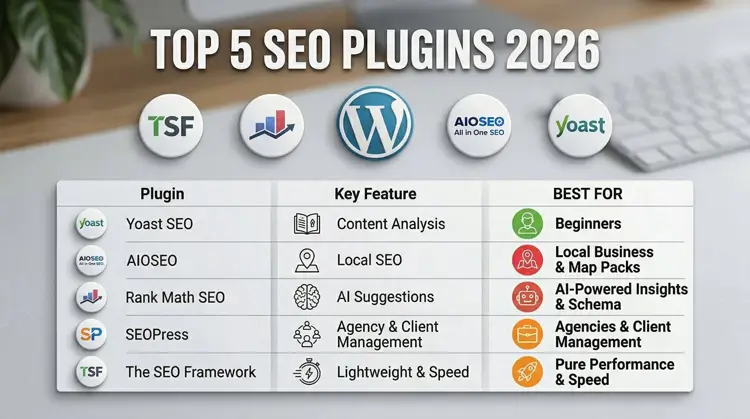
Let’s cut past the marketing copy. Here is how these heavyweights actually perform in real-world environments.
1. Rank Math:The Lightweight AI Pioneer
Rank Math has exploded in popularity, frequently ranking as the best SEO plugin WordPress users can install, largely because of its modular design. You only turn on the features you actually use, keeping the code incredibly lean.
It eliminates the need for expensive third-party tools by offering built-in keyword rank tracking directly in your dashboard.
The biggest draw is Content AI. Having semantic keyword suggestions available natively—even in the free version—makes it a massive asset for scaling content quickly.
2. All in One SEO (AIOSEO): The Local & E-commerce Giant
AIOSEO is built for stability. It handles massive, complex databases without slowing down your admin panel.
It is packed with powerful tools designed specifically for WooCommerce catalogs and hyper-targeted local SEO.
The comprehensive TruSEO score creates a foolproof checklist. This makes it an incredibly reliable choice when handing off a finished corporate site to a client’s internal marketing team.
3. Yoast SEO: The Beginner-Friendly Standard
With over 930 million downloads, Yoast remains the most recognizable name in the industry.
It is the ultimate tool for absolute beginners focusing on on-page SEO.
Its strict, color-coded meta-data control and famous readability analysis ensure that even non-technical writers can keep their content perfectly structured.
4. SEOPress: The Cost-Effective Agency Choice
SEOPress flies under the radar for the average user, but freelancers love it. It is feature-rich and highly cost-effective.
The massive appeal here is full white-labeling. You can strip out all SEOPress branding and replace it with your own logo before delivering a project.
It offers excellent handling of XML sitemaps and deep content optimization, all without spamming your dashboard with ads.
5. The SEO Framework: The Fast, Unbranded Purist
The SEO Framework is completely unbranded and blends seamlessly into the native WordPress UI.
It is built purely for performance. It runs no unnecessary background processes, protecting your server response times.
The automated settings allow you to optimize a site without constantly tweaking options. If you know SEO and just want clean code output, this is your tool.
IV. Modern Build Compatibility: Custom Fields & Grids
This is where generic advice falls flat. A modern WordPress site isn’t just a basic blog; it involves dynamic data.
To be considered the best SEO plugin WordPress provides, the tool must seamlessly map metadata to Advanced Custom Fields (ACF) and Custom Post Types (CPTs)
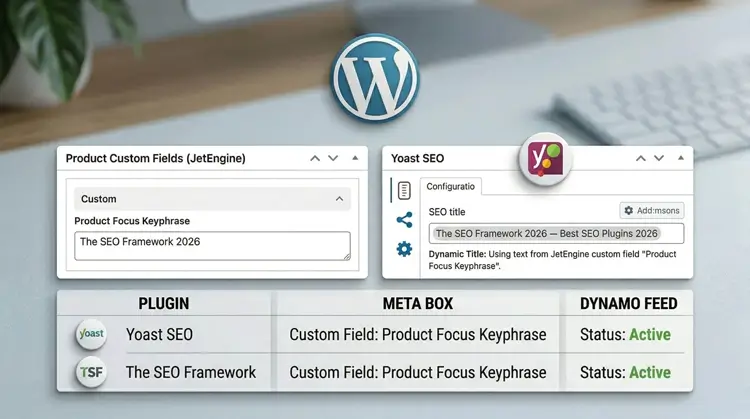
It also needs to play nice with your design stack. Whether you are building complex dynamic listing grids or designing fast, lightweight layouts using block themes like Kadence, your SEO tool cannot break your front-end architecture.
V. The Speed Multiplier: Pairing with WP Rocket
Even the best SEO plugin WordPress has to offer cannot save a slow website if your core web vitals are failing.
To get optimal results, you must pair your SEO tool with a premium speed-optimization plugin. WP Rocket is the industry standard for this.
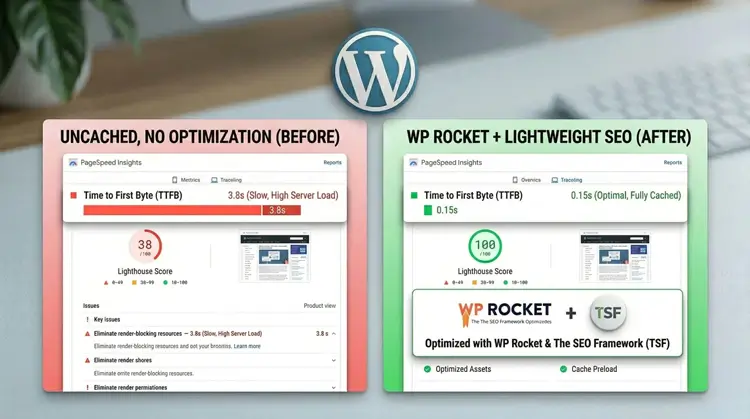
It handles the heavy lifting of caching, minifying CSS, and deferring JavaScript. Reducing your Time to First Byte (TTFB) multiplies your SEO efforts, ensuring Google can actually load and index the data your SEO plugin is outputting.
VI. Conclusion & Final Verdict
Choosing the best SEO plugin WordPress has available ultimately depends on your specific needs. Here is the fast breakdown to help you make your choice today:
- Rank Math: The clear winner for marketers who want lightweight code and built-in AI tools.
- AIOSEO: The go-to for complex WooCommerce stores and corporate local SEO.
- Yoast SEO: The safest bet for beginner teams who need strict writing guidance.
- SEOPress: The top choice for freelancers handing off white-labeled sites.
- The SEO Framework: The ultimate pick for developers obsessed with Core Web Vitals.
Pick the tool that matches your build environment, configure your sitemaps, and start publishing.